Skill DNA Card
A visual snapshot of your verified skill profile. Generated from your ShouldApply data. Share it on LinkedIn, attach it to applications, or link it anywhere you want to show your depth clearly and fast.
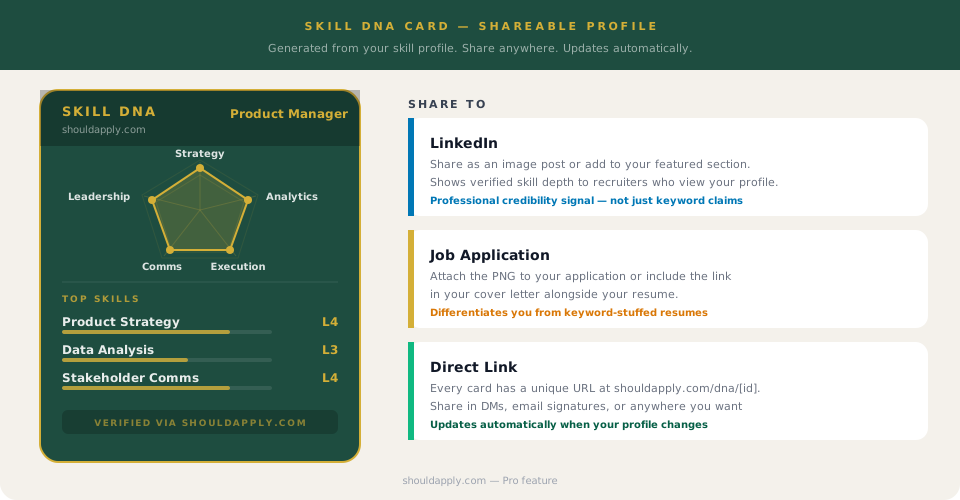
What the Card Shows
The Skill DNA Card has two visual elements and a unique shareable link. Together they give anyone who sees it a fast, structured understanding of your professional depth.
Radar Chart
A pentagon visualization of your top skill categories (Strategy, Analytics, Execution, Communication, Leadership, etc.). The shape of the chart reflects where your depth is concentrated.
Skill Depth Bars
Your top individual skills listed with their L1-L5 depth score shown as a proportional bar. Turns abstract level numbers into a visual that reads at a glance.
Shareable Link
A unique URL at shouldapply.com/dna/[your-id] that stays current as your profile updates. The PNG export is a static snapshot for posts and attachments.
Why it works: A resume is scanned in 7-10 seconds on average. The Skill DNA Card communicates your depth profile in under 3. For a recruiter reviewing 80 applications, that compression of information is meaningful. It also differentiates you from candidates whose skill claims are unverified text in a Word document.
Where to Use It
LinkedIn featured section
Add the card as an image in your LinkedIn featured section. Recruiters who view your profile see your verified skill depth before they read a single line of your experience. It functions as a credential, not just decoration.
Cover letter reference
A single line in your cover letter that links to your Skill DNA Card gives a hiring manager a fast shortcut to assess your fit before they decide whether to open your resume. This is more effective than restating skills that are already in the resume.
Recruiter outreach
When a recruiter reaches out on LinkedIn, sharing your card in the reply gives them structured information about your depth profile faster than a resume. It signals that you are organized and that you understand your own skills clearly.
Portfolio and personal site
For technical roles or any role where a personal site is common, the Skill DNA Card embedded or linked on your site gives visitors a structured view of your skill depth that a standard bio does not provide.
Generating Your Card
The card is generated from your dashboard once your skill profile has at least five skills with levels assigned. The better your profile, the more informative the card.
Upload your resume in Settings. The engine extracts skills and depth signals automatically as a starting point.
Review the extracted skills in your profile and adjust any levels that do not reflect your actual depth. The card will only be as accurate as your inputs.
Add any skills the engine missed. If you have strong competencies that are not in your resume text, add them manually.
Generate the card from your profile settings. Export as PNG for posts, use the shareable link for everything else.
Regenerate after any significant profile update. The link stays the same, so anyone who has it will see the updated version automatically.
Go Deeper
Frequently Asked Questions
How is the Skill DNA Card generated?
The card is built from your skill profile in ShouldApply: the skills you have added, the proficiency levels you have set, and the signals extracted from your resume text. The radar chart visualizes your top skill categories. The bar list shows your top individual skills with their L1-L5 depth scores.
Does the card update automatically?
Yes. The card reflects your current profile at the time it is generated. If you update your skills or upload a new resume, regenerating the card produces an updated version. Your shareable link always points to your latest card.
Can I control which skills appear on the card?
You can edit your skill profile in the dashboard to adjust which skills are included and their levels. The card surfaces your top skills by depth score, so raising the level of a skill you want featured will bring it forward on the card.
Is the Skill DNA Card free or Pro?
Generating and sharing the card is a Pro feature. The card is part of what makes Pro worth it beyond just scoring limits: it turns your profile data into something you can use outside the app to strengthen job applications and your professional presence.
How is this different from a resume?
A resume is a document. The Skill DNA Card is a visual signal. It communicates your depth profile at a glance without requiring someone to read through a full document. It works alongside your resume, not as a replacement. In a cover letter, a line like 'my full skill profile is at shouldapply.com/dna/[your-id]' gives a recruiter a fast way to assess fit before they open the resume.
Build your Skill DNA Card.
Score a job, build your skill profile, and generate a card that shows your depth at a glance. Pro feature.
Get Started Free