Ghost Job Detection
A significant percentage of job listings are ghost jobs: postings that are not actively being filled. ShouldApply detects them automatically so you stop investing time in roles with low response probability.
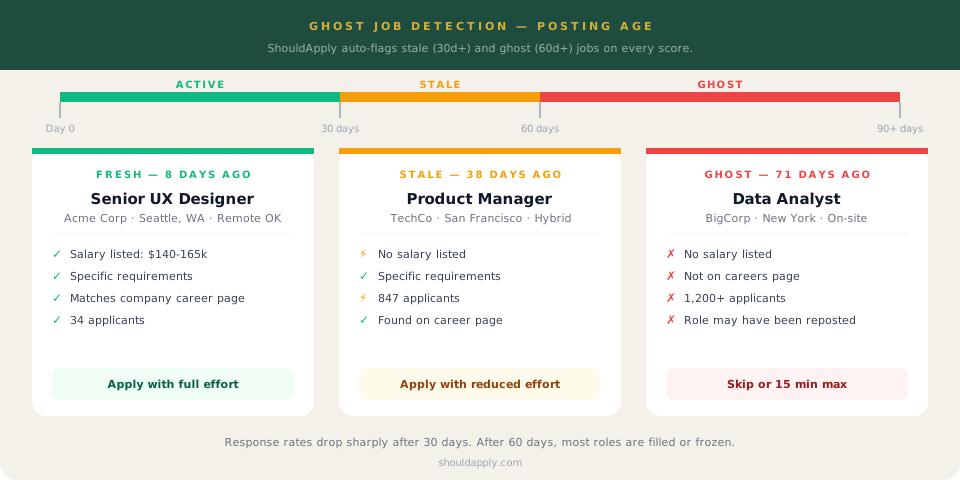
Why Ghost Jobs Are a Problem
Ghost jobs are postings that are live on job boards but are not actively being filled. Companies let them sit for several reasons: the position is on hold, it was an exploratory posting, the role was filled internally, or nobody remembered to take it down.
The cost to you is hours spent tailoring your resume and writing a cover letter for a position nobody is reviewing. The application black hole that most job seekers attribute to their own quality is often just ghost jobs at scale.
of job postings estimated to be ghost jobs or no longer active, per multiple recruiting industry analyses
lower response rate on postings over 30 days old compared to postings under 14 days, based on applicant tracking data
more likely to receive a recruiter response when applying to postings under two weeks old vs. those over 60 days
The Three Posting Status Tiers
The posting is fresh. The role is likely being actively filled. Response rates are at their highest.
Apply with full effort. This is the window where your application is most likely to be read and acted on.
The posting has been live long enough that urgency has likely dropped. The role may still be open, but the hiring pace has slowed. Response rates are meaningfully lower than fresh postings.
Apply, but calibrate your effort. A quick targeted cover letter is better than an hour of work for a role that may not be moving.
This posting has been live long enough that it should be treated as inactive unless there are strong contradicting signals. Most roles are filled or frozen within 60 days.
Skip or spend 15 minutes maximum. If you want this role at this company, a warm intro will do far more than a cold application.
Auto-Archive on Your Dashboard
When a posting you have saved crosses the 60-day threshold, ShouldApply can automatically archive it from your active jobs list. You do not lose the record. It moves to your archive where you can still access it, but it stops cluttering your active pipeline with positions that have low response probability.
Go Deeper
Frequently Asked Questions
How does ShouldApply know how old a posting is?
The posting date is extracted from the job description source when you score a role. ShouldApply reads the date posted or date listed field from the job posting. If no date is available, the system notes this and treats it with caution.
Should I never apply to stale or ghost jobs?
Not never, but calibrate your effort. A 65-day-old posting at a company you have a warm connection to is still worth pursuing, just through direct contact rather than a cold application. A 65-day-old posting with no salary and 1,200 applicants at an unknown company is almost certainly not worth your time.
Does posting age affect my fit score?
Posting age shows up in the job quality dimension of your score. It is displayed separately in the Why Not 100 breakdown so you can distinguish between skill gaps (things about you) and job quality issues (things about the posting). You should not improve your skills to fix a ghost job flag.
What if the job was reposted recently but the original is old?
If a company reposts a role, it will appear as a new posting with a current date. If you are seeing the original old posting, it is clearly stale. A repost often signals the company could not fill the role at the requirements or compensation they initially offered, which is worth knowing before you apply.
Stop applying to ghost jobs.
Every score flags posting age, salary transparency, and job quality signals automatically.
Get Your Free Score